Showing posts with label nxt. Show all posts

2012-12-11

Face tracking robot

Android 4.0 introduced an API for face detection. It's really simple to use, you only have to set up a listener and it gets called each time a face is detected in the frame captured by the camera. I used it to make a Lego Mindstorms NXT robot that turns to look at you as you move around. Here's what it looks like:


The way it works is there's an application on the phone that checks if a face is detected. Then it communicates with the robot over Bluetooth and tells it to turn left or right, depending on the position of the face in the frame. Here's the application's source code if you want to take a look. I don't have building plans for the robot itself, but any robot with tank-like steering would work.

A cool way to demo this robot would be to use it for video chats or Google+ hangouts, but I don't think there's a way for two different applications to access the camera at the same time, so the face tracking functionality would have to be integrated into a video chat app. (Or I guess I could put a second phone on the robot.)


2012-08-21

NXT delta robot

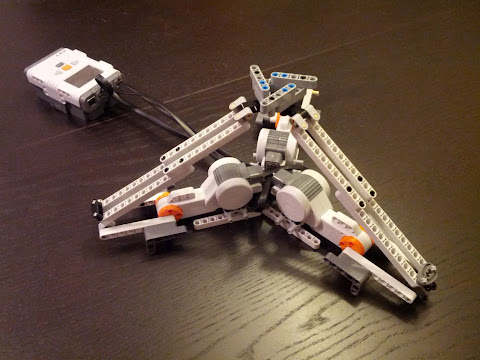
A delta robot is a robot with three motors placed on a triangular base, connected to a smaller triangular platform through three arms (the second platform is called the end effector, because it's the part that actually does stuff). The arms have universal joints in them and work as parallelograms. Because of that, the end effector's movement is restricted to just X,Y,Z translations, it doesn't rotate and stays parallel to the base. Because of their speed and precision, delta robots are widely used in the packaging industry and other places.

They're also the kind of thing that you look at and immediately think hey, I bet I could recreate that with Lego Mindstorms!


To make the robot work, we have to take the desired position of the end effector and translate it to angles to which the three arms must be rotated by the motors (fancy term for that is inverse kinematics). It involves some geometry, but luckily for us a man named Maxim Zavatsky worked it all out and posted a nice tutorial here. The program that controls my robot (which you can see here) is mostly a copy & paste of his code.

When making this robot, I found out that even though the NXT motors have encoders that tell you their rotations with degree accuracy, it's not very easy to precisely reach a certain angle on the motor. Setting up a gear reduction would help with the precision, but the Mindstorms set doesn't come with enough gears for three arms. I ended up using absolute position regulation from the enhanced NBC/NXC firmware (PosRegEnable() and PosRegSetAngle() functions). Since the PosRegSetAngle() call is non-blocking (it returns immediately and the position regulation happens in the background), it would be good to have a way of knowing when the motor has reached its set point. One solution that comes to mind is to keep watching the motor's position and when it stops changing assume that it is as close to the desired angle as it's going to get. Right now I'm using hard-coded Wait() calls, which is obviously not optimal.

My robot doesn't actually do anything (except move), but it would be interesting to attach a pen to it and make it into a drawbot. For that I'd have to somehow mount it upside down and probably work on making it a little stiffer (right now it's pretty wobbly). Another thing to try would be to reverse the calculations and turn the robot into a 3D input device (you would move the end effector by hand, read the angles from the motors, translate those into X,Y,Z and send the data to a computer).

Here's an album with some pictures of the robot.
2011-12-31

NXT Drawbot

When I saw this drawbot, I immediately thought it was something I should be able to recreate with Lego Mindstorms. And so I did. The idea is simple, there's a pen suspended on thread from motors in the corners. When the motors wind or unwind the thread, the pen moves and draws a line. The rest is a simple application of the Pythagorean theorem to move the pen where we want it.


When watching other drawbots on YouTube etc. I was surprised to see they were able to achieve a level of precision that allows them to recreate pictures by effectively drawing each of their pixels with clever patterns. My bot clearly lacks such precision. I think the main reason for that is the friction between the pen and the drawing surface. Each time the pen is about to start moving, there's a noticeable moment before it breaks away from the static friction. That makes the bot incapable of very small precise movement. There's another source of imprecision - since the radius of the spools that the threads are wound onto is small, the difference in radius when there is no thread wound and when there is a lot of thread wound on the spool is non-negligible.

Here are some more pictures of the bot.

2011-01-28

Page turner Mark II

I have improved my initial page turner design. Thanks to a third motor that repositions the rubber wheel between the left and right of the book, we can now turn pages in both directions!


The device is still manually operated and the problem of sometimes grabbing more than one page remains. But it is now less of a problem, because if we go a few pages too far, we can always go back.


2011-01-27

Automatic page turner

Reading books is hard enough as it is. They're often long, boring and some don't even have any pictures in them. I decided to at least eliminate the physical effort of turning pages and constructed this little device:


At the moment it's not entirely automatic as I'm still controlling the individual motors manually (via Bluetooth from my phone, which is off-screen, because I'm also using it to shoot the video). The setup requires some tweaking for the exact size of the book and probably only works for a certain range of pages in the middle of the book. It also still sometimes grabs more than one page. But hey, it's a start. There's obviously room for improvement, for example it would be nice to be able to turn the pages in both directions. (Update: Here's an updated version that does that.)

2010-11-12

NXT Remote Control

Two of my favorite toys right now are my Lego Mindstorms set and my Android phone. And thanks to the Bluetooth protocol I've found a way to combine them. Behold!


Since the video is quite blurry, here's a better view of the application's interface:


The third control scheme (not pictured), which I like to call the tank mode, allows you to control each motor separately and works best if your phone has true multitouch support (not just pinch-to-zoom).

Now I'm not saying my application is very unique, there are at least two others on the Android Market that do the same, including an official one from Lego. But hey, it's mine!

If you'd like to try it, below is a QR code that you can scan from your phone (or if you're reading this on your phone, just tap the code). And here's the application's AppBrain page. (It's free of course.)


Finally if you'd like to see the source code, it's over here at Google Code.

2010-08-20

Line Following Robot

Everyone with a Lego Mindstorms set must at some point build a line following robot. Here's mine.


The trick to following a line when all you have is one light sensor is that you don't follow the line, you follow the line's right (or left) edge. You try to stay exactly on the border between the dark area and the light area. The light sensor reports shades of gray when it passes from black to white. You choose a value that you think corresponds to the edge and then when the sensor reports a value brighter than the threshold value, you turn left, and when it reports a value darker than the threshold value, you turn right (assuming you chose to follow the right edge of a black line).


For smooth movement we don't just turn left when the value from the sensor is greater than the chosen threshold. Since the data we get is not binary, we can make the robot turn sharper when we think it's off the line entirely and only adjust its course slightly when we think it has left the edge of the line, but by just a little.


Here's the NXC program that the robot is running. It's heavily inspired by the NXT-G program of this robot. I initially used OnFwdSync(OUT_BC, ...) to turn the robot, but it sometimes resulted in very jerky movement. When trying to figure out whether it's a problem with my hardware or software I looked at that robot's program and saw that they control each motor independently. When I replaced calls to OnFwdSync(OUT_BC, ...) with OutFwd(OUT_B, ...) and OutFwd(OUT_C, ...) (with power values based on whether we think we should be turning right or left), the jerkiness problem was solved.

I also used their idea of calibrating the sensor at the beginning (the robot rotates a bit to the left and then to the right, noting the maximum and minimum light levels and chooses the threshold value as the average of the two).


You will note that I used a faster version of the program for the NXT Test Pad and a slower version for following the line that I made on the floor with electrical tape. I had to do this because the robot kept losing the line (probably because the tape was too narrow, it was also blue, not black, and some of the turns I made may have been too sharp).

2010-08-17

Music Tape Player

My second NXT creation is a music player that uses the color sensor to read notes from tape.


The notes are encoded using colors. I considered using shades of gray and then using the color sensor in light level mode to read them, but that would require calibration (as the readouts would be dependent on current light conditions in the room) and possibly wouldn't allow for more than 5 or 6 well-distinguishable levels anyway.


Here's the NXC program that the device is running. As you can see it constantly reads the color sensor and adjusts the sound accordingly. Another way of doing this would be to only read the color at certain intervals, which would eliminate the problem that sometimes occurs when the color sensor gets confused during the transition between one color and another. But the current approach has the nice feature that we can have notes of arbitrary lengths (by simply putting a wider or less wide stripe of color on the tape). It also doesn't require any synchronization.


Possible improvements might include:

  • an encoding scheme that would allow for more than five notes
  • a mechanism for stopping the tape at the end
  • a rewinding mechanism
  • a better tune for demonstration

2010-08-12

Sonar

This is my first Mindstorms robot. It rotates around the vertical axis while gathering data from the ultrasonic sensor. Every time it makes a full circle it plots the gathered data on the display. The results are mixed.


Can you guess what the red ball is for?


OK, so the red ball is there so that the robot knows it made a full circle. You can see that the color sensor rotates with the rest of the robot while the ball remains still.


Here's the source code for the program that the robot is running.